Showing posts with label Edline. Show all posts

Tuesday, November 10, 2015

Reminding Edline 101

Remind is a great new tool being used in high schools. Remind can be used on a website or through an application on any device. Remind lets teachers connect with their students through their phones. Teachers can text their students to remind them of homework, due dates, materials to bring to class, and really anything else imaginable. Remind will give the student a code to text to which then adds them to their teachers class. Now the students phone number is kept hidden and so is the teachers. The app will not let you text your teacher or vice versa unless you use another special feature though remind called chat. In chat you are allowed to do a two way chat with one student. Now remind is great when your students sign up. Not all teachers require you to sign up for remind. To really keep kids and parents up to date with remind you can have remind on an edline page. Teachers can now embed their remind texts on their site so all people connected on edline can see whats being sent on remind. 
This picture above shows how a regular remind text is sent to students if they are signed up on their cellphones.


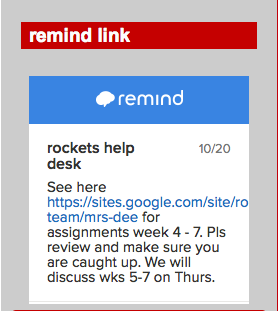
This picture above shows how the remind can be embedded into your edline page. To do this you need to go to your remind account to get the HTML come to embed into your page.


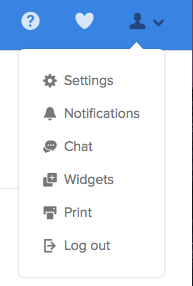
When you log into remind there is a button that you can press called my account. The icon is a silhouette of a person. When you press this icon a drop down bar comes down with different options. You are going to want to click the button widgets.
Once you clicked widgets you will be brought to a whole other page where the HTML is located. You are going to want to copy the HTML code so you have it to be pasted onto your edline page.
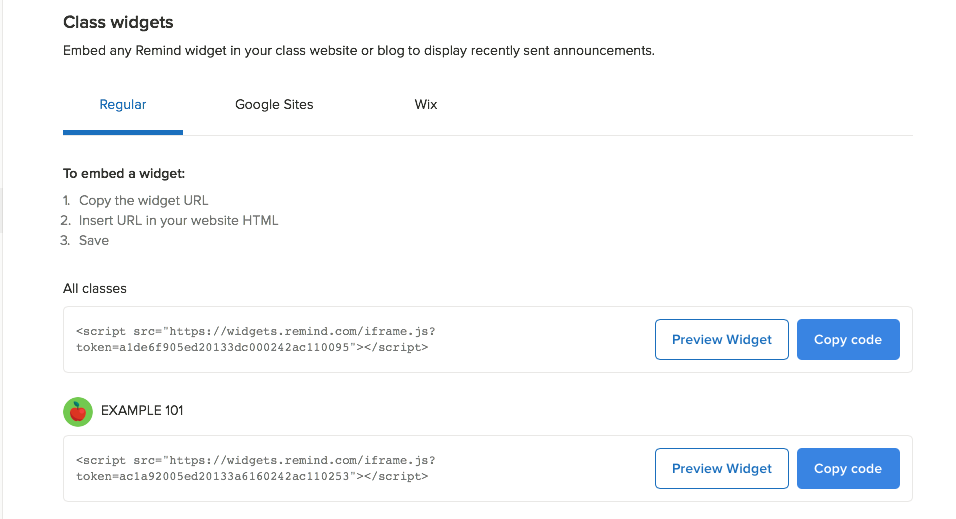
On this page you have the option to embed all classes but I would suggest just one class per edline page.
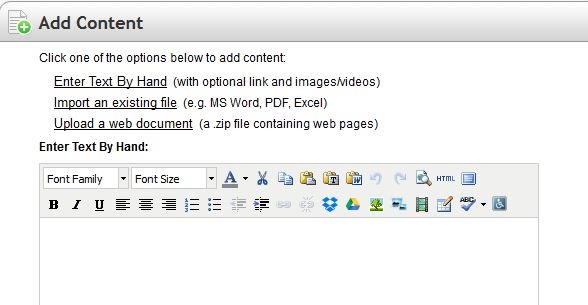

-Now on edline go into contents on your edline page.
-Make a new document
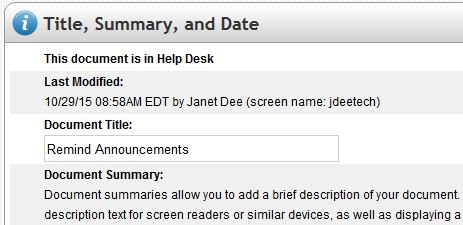
-Make a new file called “remind announcements” or whatever you would like.
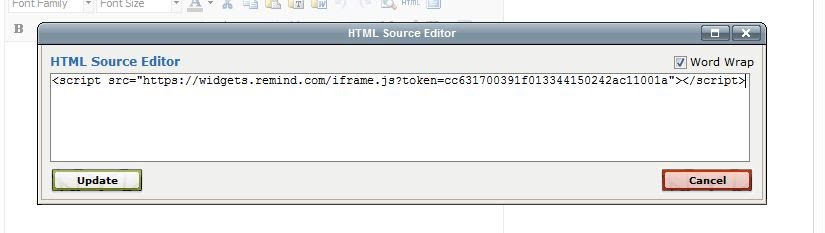

-Go to enter text by hand and that would be where you should past in the HTML code. You need to HTML icon in the document
-Then a new window will pop up and that is where you will be able to copy in the Remind HTML code.
-Once you copy in the code hit update. You will see nothing but that's ok.
-Make sure to save the changes

               -The remind will show up in the corner as a clickable link.
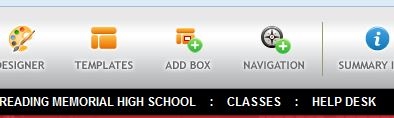
-To make it really appear in the corner go to edit this page and click the “add box button”
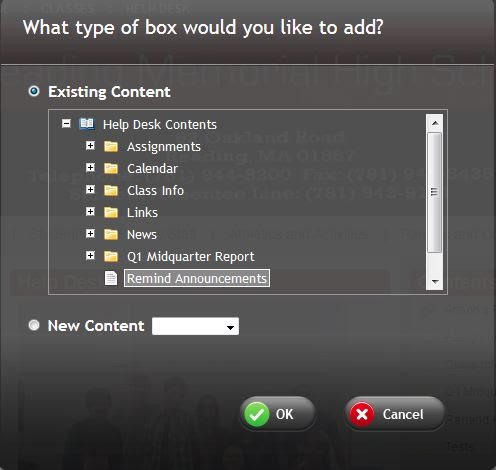
-When you add a box you click on the box and the you select remind announcement -Then click “ok” and the remind announcement will show up at the top of the page
-Then grab the box and drag the box to your desired place on the edline page
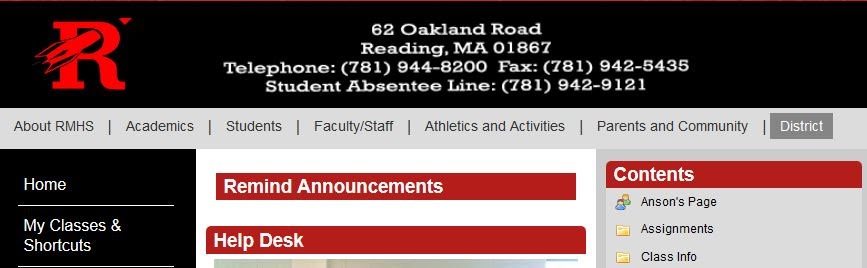
     -The remind box will look blank
-Go into the setting then design properties wheel of the box and go to the “other" tab. Go to the first line and change from summary to auto height and then click the apply button and then the remind button will finally show up in your box.
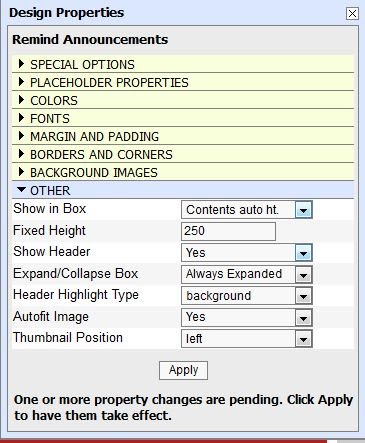
-Remember to X out of the property box.
-Save your design
Your finished product should look like the image below


Tech Integration Profile: Ms. Jones

Rockets Help Desk loves to identify when teachers use technology in their classes to benefit their students. This week we are focussing on Ms. Jones, a math teacher at Reading Memorial High School. She is also the Co-Advisor of the class of 2019 and the advisor of the Leo Club. 

Edline is the online tool that RMHS uses to give teachers their own website page for each of their classes. Ms. Jones utilizes Edline to upload class notes, homework assignments, study guides, and various assignments. Below is the transcript of our interview with her. 


RHD: Why did you decide to use Edline?
Ms. Jones: I decided to use Edline because it is a resource that the school district does pay for. Personally, I would prefer using Google Drive but I want to use a resource consistent with my peers and I recognize that this is may be more convenient for the students.


What do you upload to Edline?
I upload grades on a weekly basis, daily notes, weekly homework assignments, study guides, various projects, etc.


How much impact does it have on your teaching?
Edline has a significant impact on how I communicate with my students and their parents outside of the classroom. It allows me to provide resources for struggling students, to easily communicate with parents, and it allows students to have access to classroom material even if they are not in class.


Does using Edline make it easier for you, the teacher?
Edline makes many aspects of my role as a teacher easier. For example, I can assure that students who are absent have access to notes. Also, I can easily communicate with parents using the messaging feature and weekly grade reports. Parents are a vital role in what I do, and it allows more two-way communication between us. And, it works out well when my students lose assignments or forget to write down their homework because it is always available online. This does require more work on my end for certain things, but the results are well worth it!


How have students responded to your use of Edline?
Students LOVE that their grades are available online on a weekly basis and that notes are always available online. Some students did not like when I posted homework on Edline and not in the classroom. They would often forget to check their homework, even though that is their responsibility and it was posted a week in advance. I now post homework on Edline and in the classroom.


Do they like it better?
This would be a great question for one of my students! I am not sure what they have to compare it to. Personally I think Google Drive is more user friendly and more reliable, but it is important to be consistent across the district.


Do they use it?
I would like to think all of my students do, but I know that this is not the case. I think it is safe to say that almost all of my students do.


What happens if Edline doesn't work, if the site crashes? How does it impact you, your students, and your class?
This puts a big damper on my work. But, I generally try to plan ahead and make sure that everything that would need to be online for a week's worth of classes is done a week before. It may delay me from taking attendance or inputting grades, it has caused students to not get their work done, and it has made me assure myself that I always have a backup plan!

When I had Ms. Jones last year for Geometry, I found it super helpful that she uploaded class notes and homework to Edline. It helped me if I was out, and it always gave me easy access to what the homework was.


Here are some screen shots of Ms. Jones' Edline page: